Quick answer
Claude Code is free to install, but its default Claude models are paid. To use it for free, point it at a local router that serves free models instead:
install Free-LLM Router, add two or three free API keys (Google AI Studio, FreeInference, OpenRouter…), run free-llm setup claude, and start claude as usual.
When one free provider hits its limit, the router switches to another one automatically.
Claude Code is one of the best coding agents around: it reads your repository, edits files, runs commands and checks its own work. The catch is the model behind it. Out of the box it talks to Anthropic's Claude models, and those need a paid plan or API credits.
The agent itself doesn't care which model answers, as long as the answer comes back in the format it expects. Meanwhile dozens of providers give away capable models for free — our directory currently lists 66 providers that can be used this way, 25 of them without a credit card. This guide connects the two, in about five minutes.
What is free, and what isn't
- Free: the Claude Code program, the router, and the free tiers of providers like Google AI Studio, FreeInference, Inferbase, OpenRouter, NVIDIA NIM or Mistral.
- Not free: Anthropic's own models (Claude Sonnet, Opus, Haiku). You won't be using them in this setup.
- The trade-off: free models are very good for everyday coding but still behind the best paid models on long, complicated tasks. Each free tier also has limits — which is why we use several of them at once.
How it works
Claude Code speaks the Anthropic API. Almost every free provider speaks the OpenAI API. So you need a translator in the middle — and since every free tier is small, that translator should also be able to switch provider when one says "rate limit reached". That's exactly what Free-LLM Router does, on your own computer:
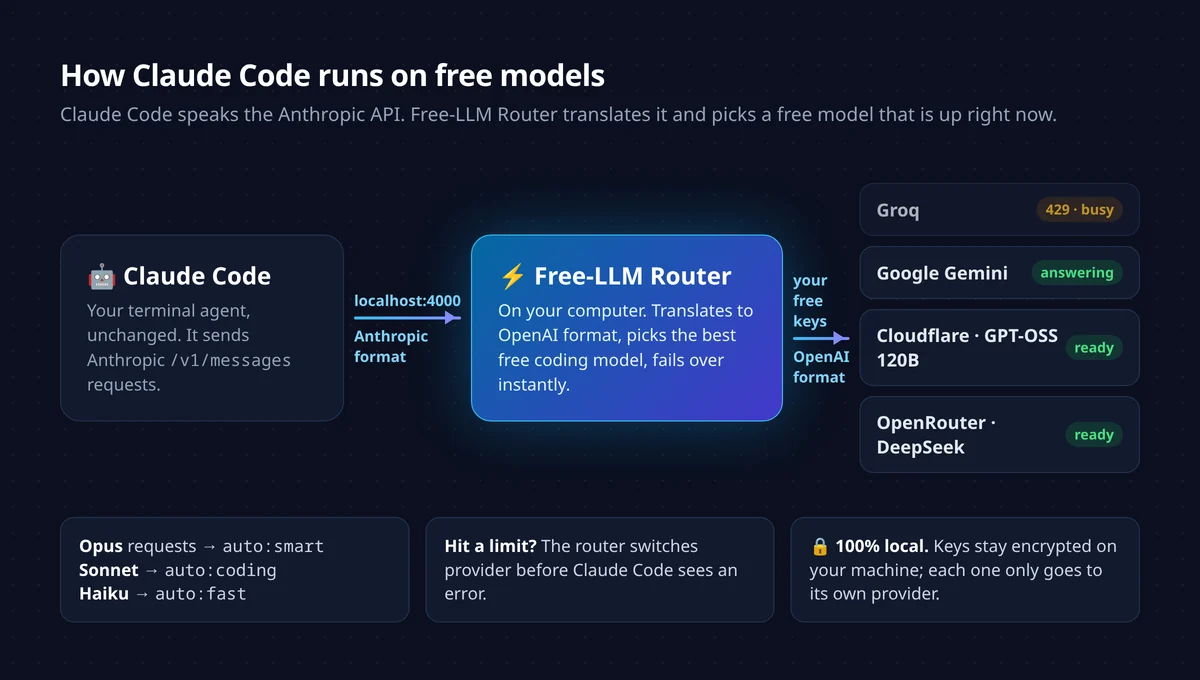
localhost:4000; the router translates and picks a free provider that is up. If Groq is busy, Gemini answers.
Claude Code asks for "Opus", "Sonnet" or "Haiku" depending on the task. The router maps those names to profiles: auto:smart (most capable free models),
auto:coding (strongest coding models) and auto:fast (quickest, for small background tasks).
Step 1: Install Claude Code
If you already use Claude Code, skip to step 2. Otherwise you need Node.js 18 or newer, then:
npm install -g @anthropic-ai/claude-codeCheck it works with claude --version. You don't need to log in to an Anthropic account for this setup.
Step 2: Install Free-LLM Router
One line on macOS or Linux (no admin rights, nothing installed globally):
curl -fsSL https://free-llm.com/install.sh | shOn Windows, in PowerShell: irm https://free-llm.com/install.ps1 | iex. Or with npm: npm install -g github:nejib1/Free-LLM.
A short guided setup starts. It shows the best free providers to sign up for, lets you paste keys, tests each one, and offers to configure Claude Code for you. Here is the whole sequence in a terminal:
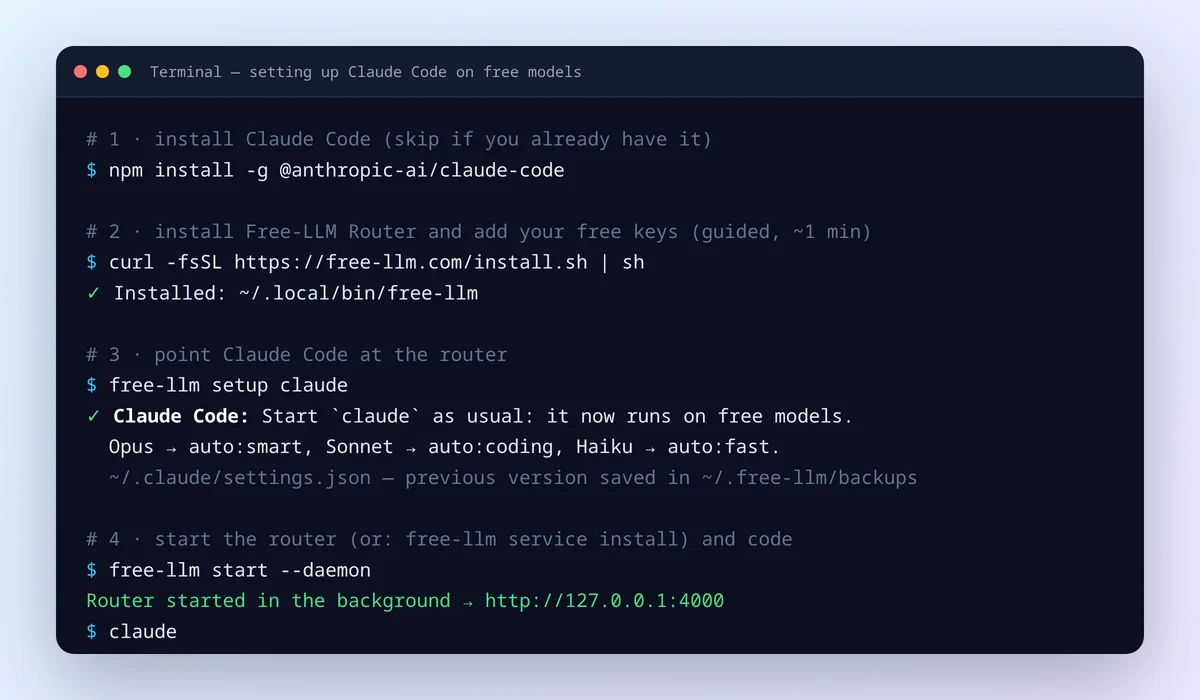
free-llm setup claude backs up your previous Claude Code settings first.Step 3: Add two or three free API keys
The router already answers without any key ("guest mode"), but guest capacity is tiny and shared — not enough for an agent that sends 20,000-token prompts. For Claude Code, add real free keys. Each takes a minute:
| Provider | Sign-up | Good for Claude Code because… |
|---|---|---|
| Google AI Studio | 🟢 no card | Gemini Flash models with 1M-token context; handles large prompts well |
| Inferbase | 🟢 no card | Kimi K2.7 Code and DeepSeek V4 Flash on a daily free allowance ($0.50 of usage per day) |
| FreeInference | 🟢 no card | GLM-5.3 Flash, DeepSeek V4 Flash and MiniMax M3, no published daily cap |
| OpenRouter | 🟢 no card | many :free models behind one key (about 50 requests/day free) |
| NVIDIA NIM | 📱 phone check | large catalog of strong open models |
Click the provider name to see the exact sign-up steps. Then paste the key in the guided setup, or open the dashboard at http://localhost:4000 → Free keys:
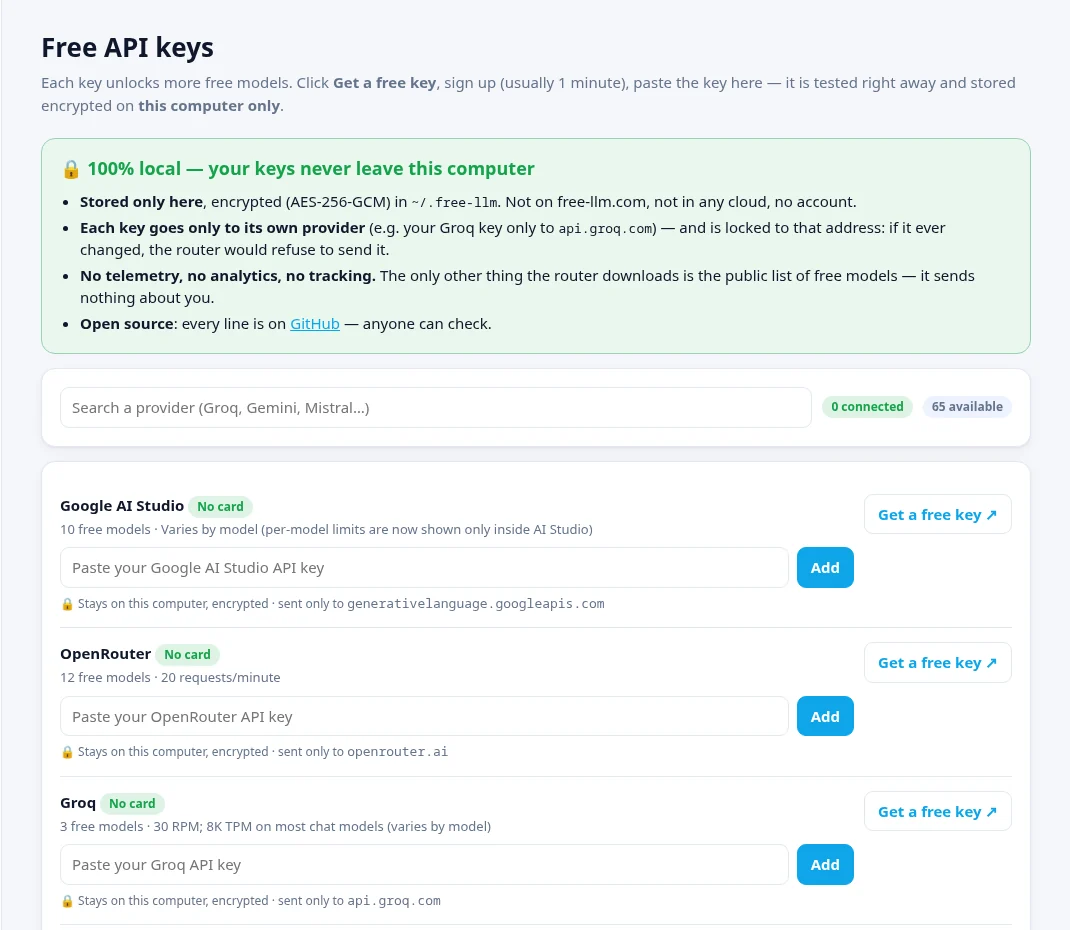
A word on Groq: it is extremely fast, but its free tier allows about 8,000 tokens per minute on most chat models. A single Claude Code request is often bigger than that, so Groq rarely serves Claude Code — the router simply skips it and uses another provider. Groq stays very useful for chat and smaller tools.
Step 4: Connect Claude Code
free-llm setup claude      # writes the router address into ~/.claude/settings.json
free-llm start --daemon    # starts the router in the background
claude                     # use Claude Code as usual
That's it. free-llm setup claude sets ANTHROPIC_BASE_URL and a local key in Claude Code's settings, and maps Opus, Sonnet and Haiku to the router's profiles.
To start the router automatically when you log in, run free-llm service install.
Prefer not to touch your settings? Run a single session instead:
free-llm launch claudeWhich free models Claude Code will use
You don't pick a model by hand: for each request the router chooses the strongest free model that is available right now, measures how it performs, and moves on if it fails. These are the strong free coding models it can rotate between today, and how many providers serve each one for free — more providers means more free capacity:
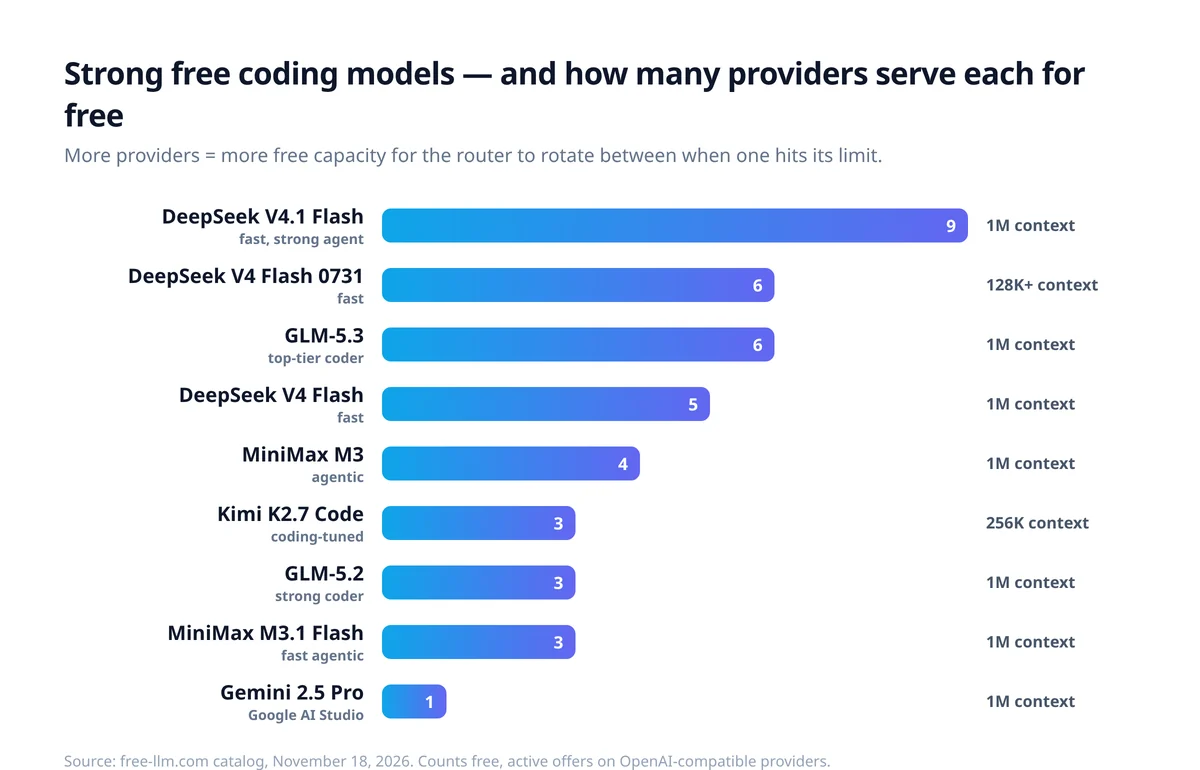
Want a specific one? Ask for it by name — for example set ANTHROPIC_DEFAULT_SONNET_MODEL=glm-5.3 — and the router uses any provider that serves it for free,
falling back to auto:coding if none is available. The full, live list is on free-llm.com/models.
Without the router: one provider with an Anthropic endpoint
A few providers accept Claude Code's format directly: OpenRouter, Z.AI (GLM Flash models) and FreeInference. You can point Claude Code straight at one of them:
export ANTHROPIC_BASE_URL="https://openrouter.ai/api"
export ANTHROPIC_AUTH_TOKEN="your-openrouter-key"
export ANTHROPIC_API_KEY=""
export ANTHROPIC_MODEL="google/gemma-4-31b-it:free"
claude
This works, but you are tied to a single free tier: when it hits its daily limit (about 50 requests a day on OpenRouter's free plan), Claude Code stops until the next day. The router removes that ceiling by spreading the work across every key you add.
Free vs. paid: what you give up
| Claude plan / API | One free provider | Free-LLM Router | |
|---|---|---|---|
| Cost | Monthly plan or per token | $0 | $0 |
| Models | Claude Sonnet / Opus | That provider's free models | Best free model available, any provider |
| When the limit is reached | Plan cap or bill | Stops until reset | Switches to another free provider |
| Hardest tasks | Best | Good | Good (+ auto:smart, auto:fusion) |
| Setup | Log in | Environment variables | One command |
A common approach: free models for most of the day, a paid model only for the tricky parts. Switching back is one command (free-llm setup claude --remove).
Tips for coding on free models
- Add more than one key. Three providers is the sweet spot: if one is busy, the next answers in a fraction of a second. You can also add several keys for the same provider.
- Keep the context lean. Use
/compactin long sessions and/clearbetween unrelated tasks. Smaller prompts fit more free tiers and run faster. - Big repository? Set the Sonnet model to
auto:longto prefer models with 1M-token context windows. - Double-check important answers with
auto:fusion: three different free models answer and the best parts are merged. Slower, but useful for reviews. - Watch what happens in the dashboard's Activity page: you see which model answered each request and every time the router switched for you.
Troubleshooting
- "All free models failed for this request"
- Every provider you added is busy or out of quota at that moment. Wait a minute or add another free provider in the dashboard — the more keys, the rarer this gets. Guest mode alone is not enough for Claude Code.
- Claude Code warns about an "auth conflict" or uses your Anthropic account
- An ANTHROPIC_API_KEY in your shell takes priority. Unset it (unset ANTHROPIC_API_KEY) or run free-llm launch claude, which sets everything for that session.
- Answers are slow
- Some free models take a few seconds to start. Add a fast provider, or set the Haiku model to auto:fast. The router learns which providers are quick and prefers them.
- A tool call is garbled or ignored
- Weaker models sometimes write tool calls as text; the router rescues the common formats. If one model keeps failing, switch it off in the dashboard (Models page).
- "Connection refused" on localhost:4000
- The router isn't running. Start it with free-llm start --daemon, or install it as a service with free-llm service install. free-llm doctor checks everything at once.
Is it safe?
The router asks for your API keys, so it's a fair question. Everything runs 100% locally: the router is a small program on your machine, listening only on localhost.
Keys are stored encrypted (AES-256-GCM) in ~/.free-llm and never uploaded — not to free-llm.com, not to any cloud. Each key is only ever sent to its own provider, and is locked to that provider's address.
There is no account and no telemetry, and the code is open source.
Details on the router page.
Skip the per-provider setup: Free-LLM Router
One address for all 66 free providers. Your tool keeps working when one runs out of quota — the router switches to the next free model instantly. free-llm setup claude and you're done. 🔒 100% local: your keys never leave your computer.
FAQ
Is Claude Code free?
The Claude Code program is free to install. What costs money is the model behind it: by default it uses Anthropic's Claude models, which need a paid Claude plan or API credits. You can instead point Claude Code at free models from other providers, which is what this guide shows.
Can I use Claude Code without a subscription?
Yes. Set Claude Code to talk to a local router (Free-LLM Router) instead of Anthropic. The router answers with free models from providers such as Google AI Studio, FreeInference, Inferbase or OpenRouter, using free API keys you create yourself.
Which free model works best with Claude Code?
Models that handle tool calls and long prompts well: GLM-5.3, DeepSeek V4 Flash, Kimi K2.7 Code, MiniMax M3 and Gemini Flash/Pro. With the router you don't have to choose: the auto:coding profile picks the strongest one that is available at that moment.
Why does Claude Code fail with my Groq or Mistral URL?
Claude Code sends Anthropic-format requests to /v1/messages, while Groq, Mistral and most free providers only understand the OpenAI format. You need something in between that translates, like Free-LLM Router, or a provider with a native Anthropic endpoint (OpenRouter, Z.AI, FreeInference).
Is it as good as using Claude Sonnet or Opus?
Not on the hardest tasks. Today's free models are strong for everyday coding (reading code, small features, fixes, tests, refactors), but Anthropic's own models are still ahead on long, complex agent work. Many people use free models for most of the day and keep a paid plan for the hard parts.
Are my API keys safe?
With Free-LLM Router everything runs on your computer. Keys are stored encrypted in ~/.free-llm, never uploaded, and each key is only sent to its own provider. The router is open source, so you can check this yourself.
How many free requests do I get?
It depends on the keys you add. Each provider has its own free limits (per minute and per day), and the router adds them up by switching between providers. Two or three good providers are enough for a normal working day; adding more keys gives more headroom.
How do I go back to my normal Claude account?
Run "free-llm setup claude --remove". It removes the router settings from ~/.claude/settings.json; your previous file is also kept in ~/.free-llm/backups.
Free tiers change often. Limits and model lists in this guide come from the free-llm.com directory on November 18, 2026; the router always uses the live list. See also: best free LLMs for coding and building a free LLM fallback system.